[UPDATED][DEPRECATED] Simplify3D: Confusing First Layer settings
UPDATE:
Has has been pointed out, while this blog post was accurate many years ago, it no longer applies.
First Layer Height and Width:
Simplify3D 4.0 is a powerful 3D mesh slicer program for 3D printing with many options and settings, some of which are non-obvious. Such is the case with the First Layer Settings, under a process' Layer tab. Until I happened upon a post in Simplify3D's forums I didn't understand the effects of changing the First Layer Height and First Layer Width settings, causing me a lot of frustration and failed first layers.
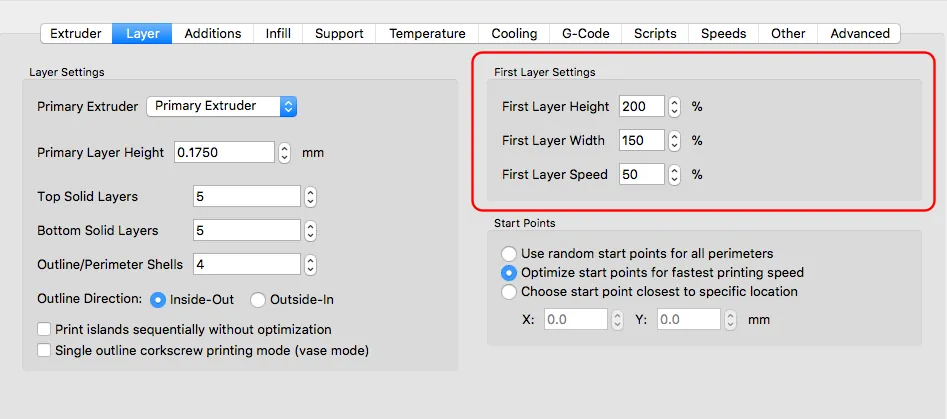 View full-size image
First Layer Height:
Both nozzle height and extrusion amount can be affected by this setting, but perhaps not in the way you think.
If set below 100%:
Amount of extruded plastic is UNCHANGED.
Layer height (distance from nozzle to printing bed) is REDUCED
Values below 100% ONLY lower the nozzle closer to the printing surface. Essentially squishes the standard amount of plastic into a lower layer height.
This is meant to help with adhesion.
if set above 100%:
Amount of extruded plastic is INCREASED.
Layer height is INCREASED.
BOTH extrudes more plastic AND pulls the nozzle slightly away from bed so as not to squish the layer.
This is used primarily when printing fine layer heights and/or on slightly uneven printing beds. The extra height and plastic volume makes thin layers thicker and also helps smooth out bumps and inconsistencies in bed surfaces.
First Layer Width:
Width changes ALWAYS AFFECT extrusion amounts, but leave Layer Height UNCHANGED.
If set below 100%:
The amount of extruded plastic is REDUCED.
If set above 100%:
The amount of extruded plastic is INCREASED.
For reference, here's the full thread in Simplify3D's forums: https://forum.simplify3d.com/viewtopic.php?f=9&t=2292&start=20#p18419
13 comments
Comments are closed. These were left on the previous version of this site. Questions? Get in touch.
Hi Federico,
Thanks for posting this! Very helpful!
One problem, when I click on the forum link at the bottom of the article, it brings me back to the article instead of the forum. If I copy and past it, I get to the forum.
Thanks again!
Thank you for pointing out the problem with the forum link, Rp. I've corrected it.
Glad you found the post helpful!
Hi Federico,
Regarding layer width. Have you checked the Gcode?
No matter which width I enter, the extruded quantity always remains the same.
In this respect it works like the other slicers.
Michael
Hi Michael,
I previously hadn't checked the Gcode for validation, though in my non-scientific tests, there did appear to be more plastic extruded.
However, I just did a test with an old model and created two gcode files, one with layer width set to 100% and a second one set to 400%. The previews show much wider lines being drawn and I see in the gcode that the E commands for the first layer are different -- about 4x different.
Can you send me your gcodes?
I made two tests, one with 100% and one with 200%.
The E value is almost the same.
The 200% is even slightly less which is logical if you know how slicers handle thicker extrusion width.
You can see my comments on rc-network: http://www.rc-network.de/forum/showthread.php/632131-Bau-des-DIY-3D-Druckers-Mika3D/page55
It is comment #823
I can send you my gcodes.
Hi. I just sent you the two test files I generated. Hope they help.
Thank you for your gcodes.
In both cases the first layer ends with E 573.0794
I'm not sure what to tell you. The information I presented came from S3D's website and, at least in preview mode, when I change the first layer width, the preview shows a thicker, wider line. And when I print, I do indeed see a wider line.
Perhaps that's accomplished differently than was described in S3D's website.
FYI, Simplify3d has updated their First Layer Height settings in 4.1. Specifically "Using a first layer height below 100% will now correctly reduce the amount of extruded material (alternatively, a negative global Z-axis offset can be used to lower the first layer while still extruding the same amount of material)"
Here's the full release notes: https://www.simplify3d.com/software/release-notes/
I wasn't aware of that. Thank you for letting me know!
This used to be correct back in 2016. But I've analyzed the GCode produced. Both first layer height and first layer width change both the distances AND extrusion amounts, regardless of whether the percentage is above ore below 100.
Thanks Don. I'll put a note in the post indicating that it no longer applies.
This information is mostly still valid except for First Layer Height less than 100% DOES reduce extrusion. See gcode below (from version 4.1.2):
First Layer - Height 50%, Width 50%:
; tool H0.100 W0.200
G1 Z0.100 F1002
G1 X105.219 Y106.200 E0.0273 F1200
First Layer - Height 100%, Width 100%:
; tool H0.200 W0.400
G1 Z0.200 F1002
G1 X105.095 Y105.900 E0.1166 F1200
First Layer - Height 150%, Width 150%:
; tool H0.300 W0.600
G1 Z0.300 F1002
G1 X104.970 Y105.600 E0.2795 F1200